Shipping an AI product people can trust
A bespoke language learning app that transcribes Chinese podcasts
- Timeline
- October 2026
- Role
- Designer/Builder
- Skills
- AI Product DesignDesign SystemPrototypingClaude Code
Overview
Introducing Pebble
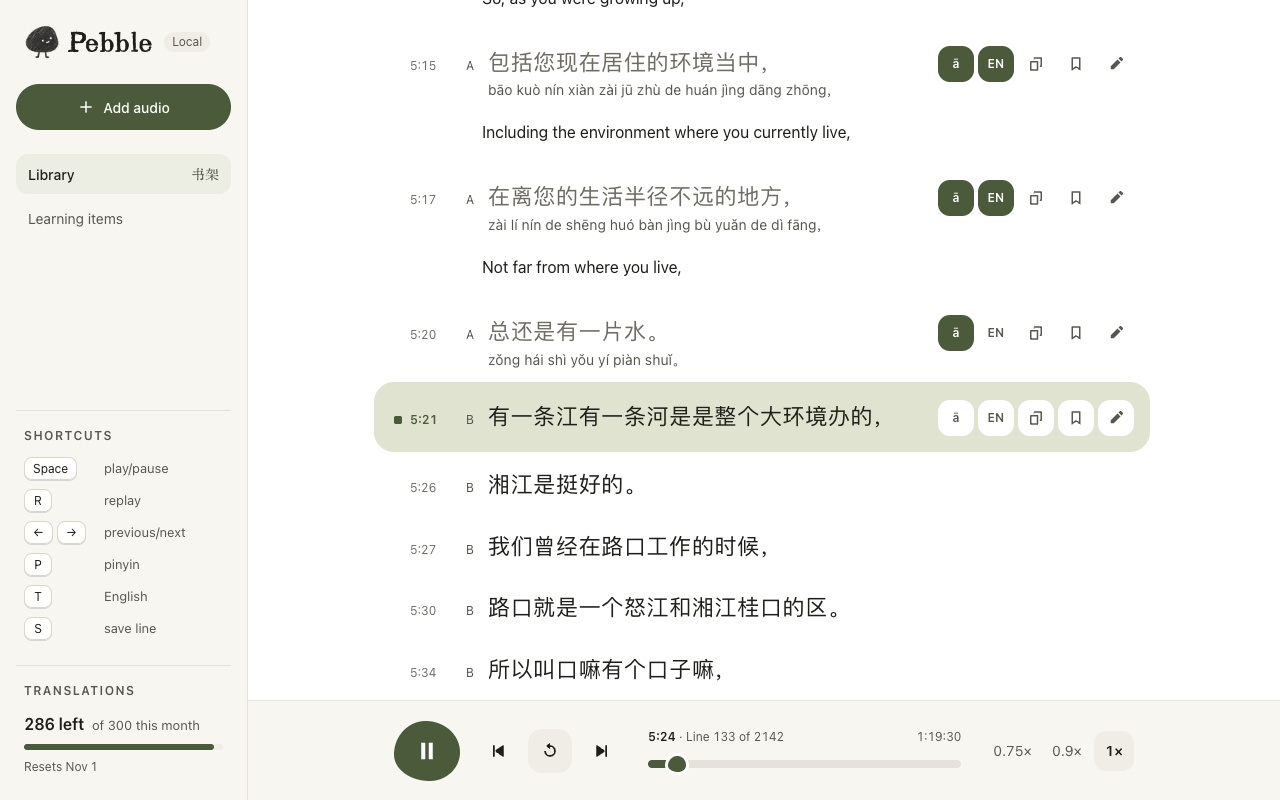
My newest personal software is Pebble, a bespoke language learning app I built for my own learning. It transcribes Chinese podcasts, adds pinyin and English on demand, and exports vocab to Anki. Building it in Claude Code sharpened how I think about designing AI products, so here’s my process.
Pebble saves me an estimated 2+ hours per episode, which adds up to 20+ hours across the 10+ episodes I've transcribed.
Claude Code handled the machine learning, using FunASR for audio transcription (which I chose for handling Chinese dialects better) and DeepL for machine translation, and I made the product and design decisions.
Problem
Following a Chinese podcast meant screenshotting subtitles every 30 seconds
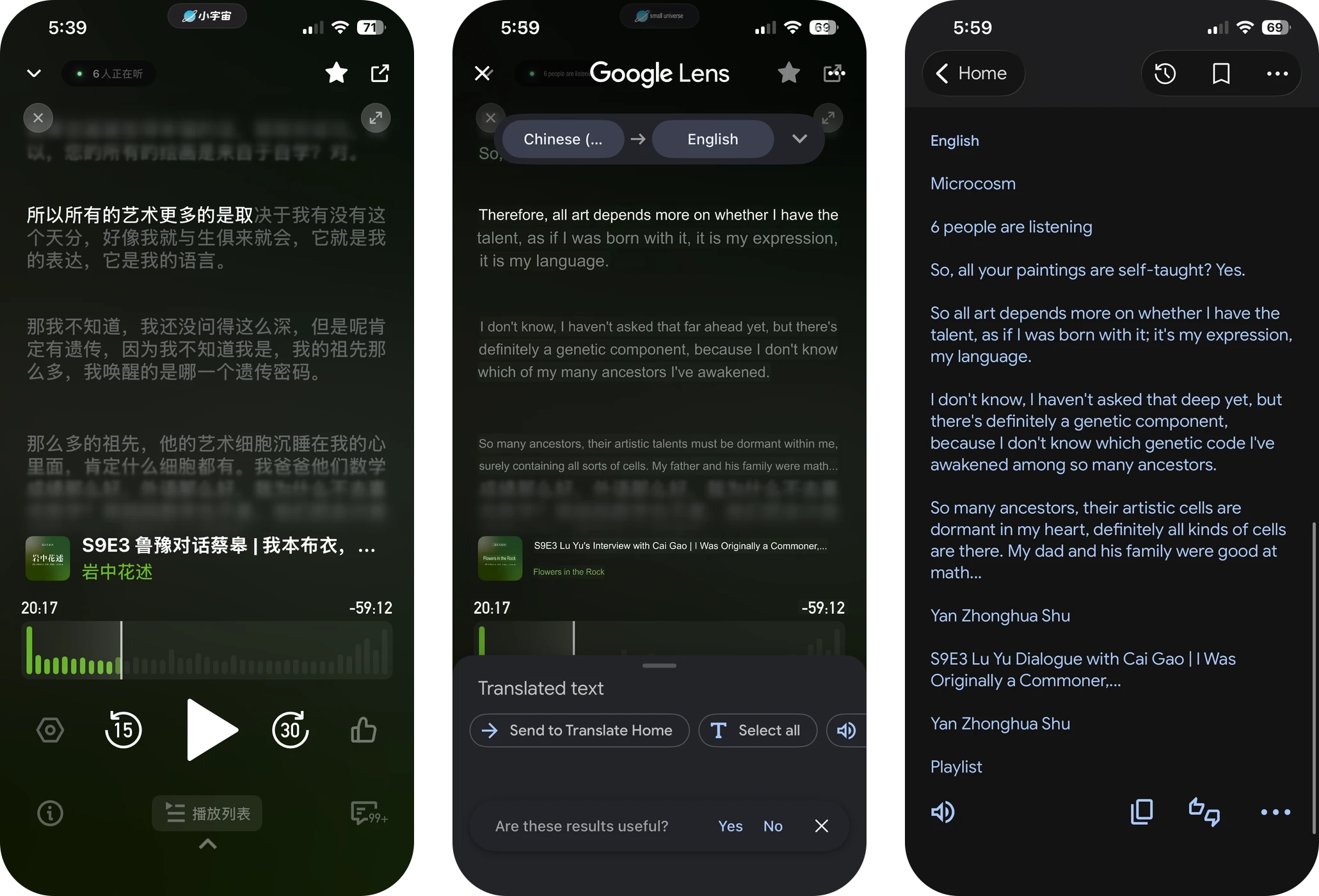
I wanted to listen to a Chinese podcast on 小宇宙 (Xiaoyuzhou), but the app is built for native speakers, so following along meant screenshotting the subtitles every 30 seconds and pasting them into a translator. A very high friction experience that I wanted to solve!
Research
Translation alone doesn’t teach a language
In my competitive research, Kollab was the closest direct competitor: it also transcribes and translates Chinese podcasts from Xiaoyuzhou. But translation alone serves someone who wants to understand an episode, not someone learning the language. Pebble fills that gap by keeping the Chinese front and center, revealing pinyin and English only when a learner asks, and exporting vocab to Anki so the listening turns into review.
Strategy
AI-second, not AI-first
Pebble runs on AI, but I design it AI-second: I add “quiet AI” only where it removes friction or speeds up success. An AI-first mentality tends to turn teams into a feature factory of sparkle buttons, chatbots, and slop.
Working from first principles, I start with the job to be done and employ design patterns people already trust. AI powers them in the backdrop of a familiar audio transcript interface, showing pinyin when you toggle it on and English on tap. With so many proven design patterns available, being a chatbot loyalist is a local maximum, not a global one.
AI should help the learner continue listening. It should not pull them into prompting, passive reading, or a separate workflow.
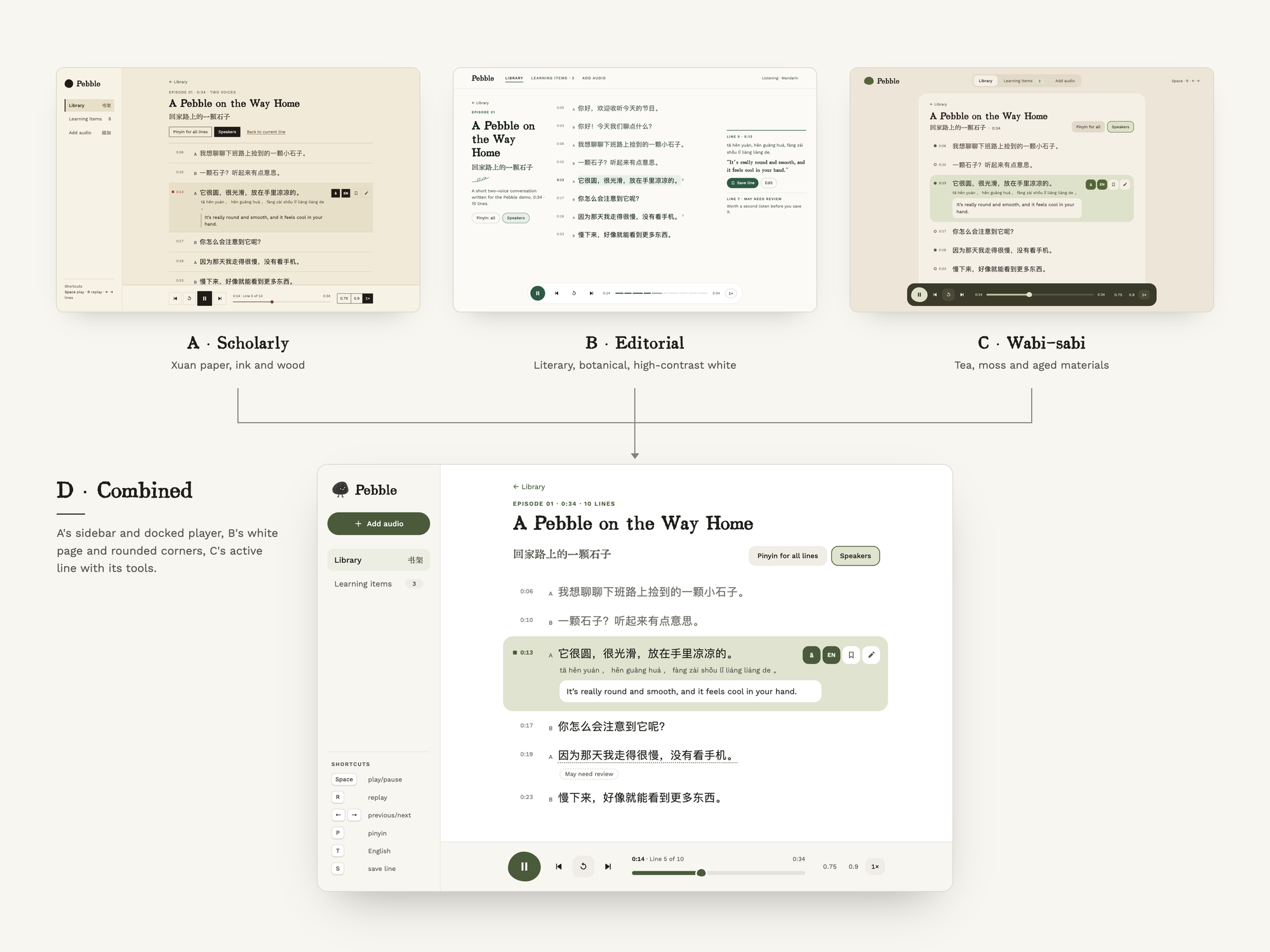
AI can’t one-shot a design and probably never will, so I ask Claude to generate three visual directions. This way I can play with the brand direction, micro-interactions, and feel before committing to one—or combining the best parts of each—to refine.
Design decisions
Pinyin and English on demand
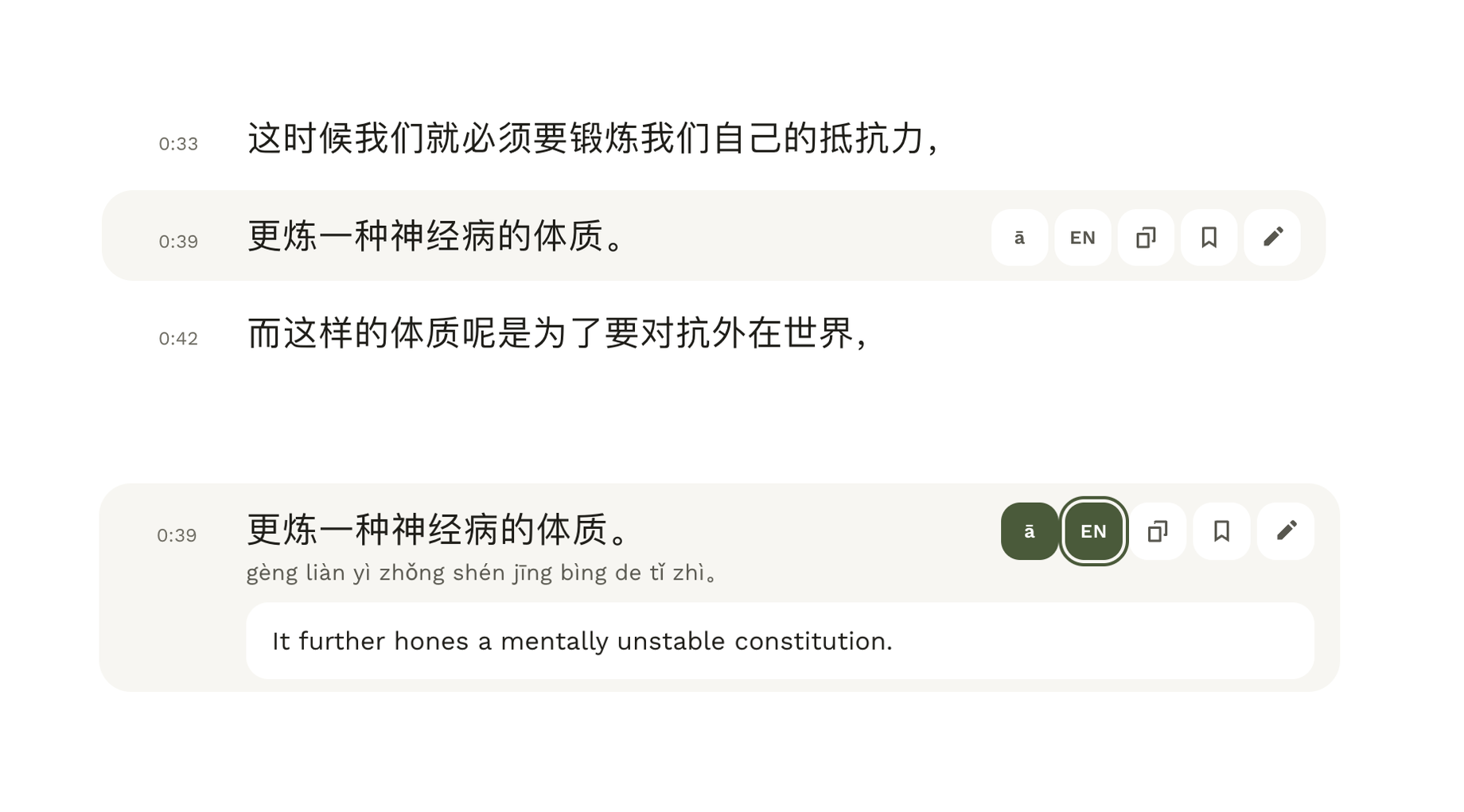
Pebble could show pinyin and English under every line, but a transcript like that pulls learners into passive reading, which the product is meant to avoid. So each line starts as Chinese only, and the learner reveals pinyin (ā) or English (EN) one line at a time, only when they need it. The Chinese stays the main thing, and the help is one tap away.
Scoping translation and a popup dictionary
Pebble translates on tap instead of translating everything from the get-go, because translation costs come out of my pocket. To keep that transparent, the sidebar shows how many translations are left each month.
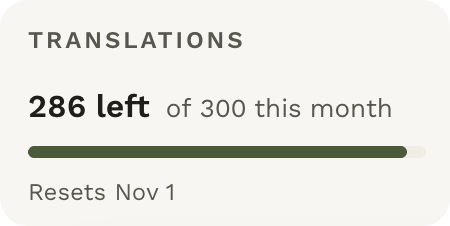
I used DeepL because it reads naturally, is more predictable than an LLM, charges per character (a fit for tap-to-translate), and came free with my account, since engineering and business constraints matter as much as quality. It's also the one thing that leaves my computer, so it's opt-in: after a one-time consent, only the single line you tap is sent, and a monthly cap of 300 translations keeps costs bounded.
The MVP lets you translate sentences on tap, which leaves a gap for users who need to translate at the word or character level.
Building a popup dictionary for Pebble to close that gap for first-time users was possible, but out-of-scope. I triaged priorities and chose the highest leverage workaround, which captured 80-90% of value and 10% of engineering effort. That was to prompt users to download the Zhongwen popup dictionary Chrome extension and use it in tandem with Pebble.

Saving lines and exporting to Anki
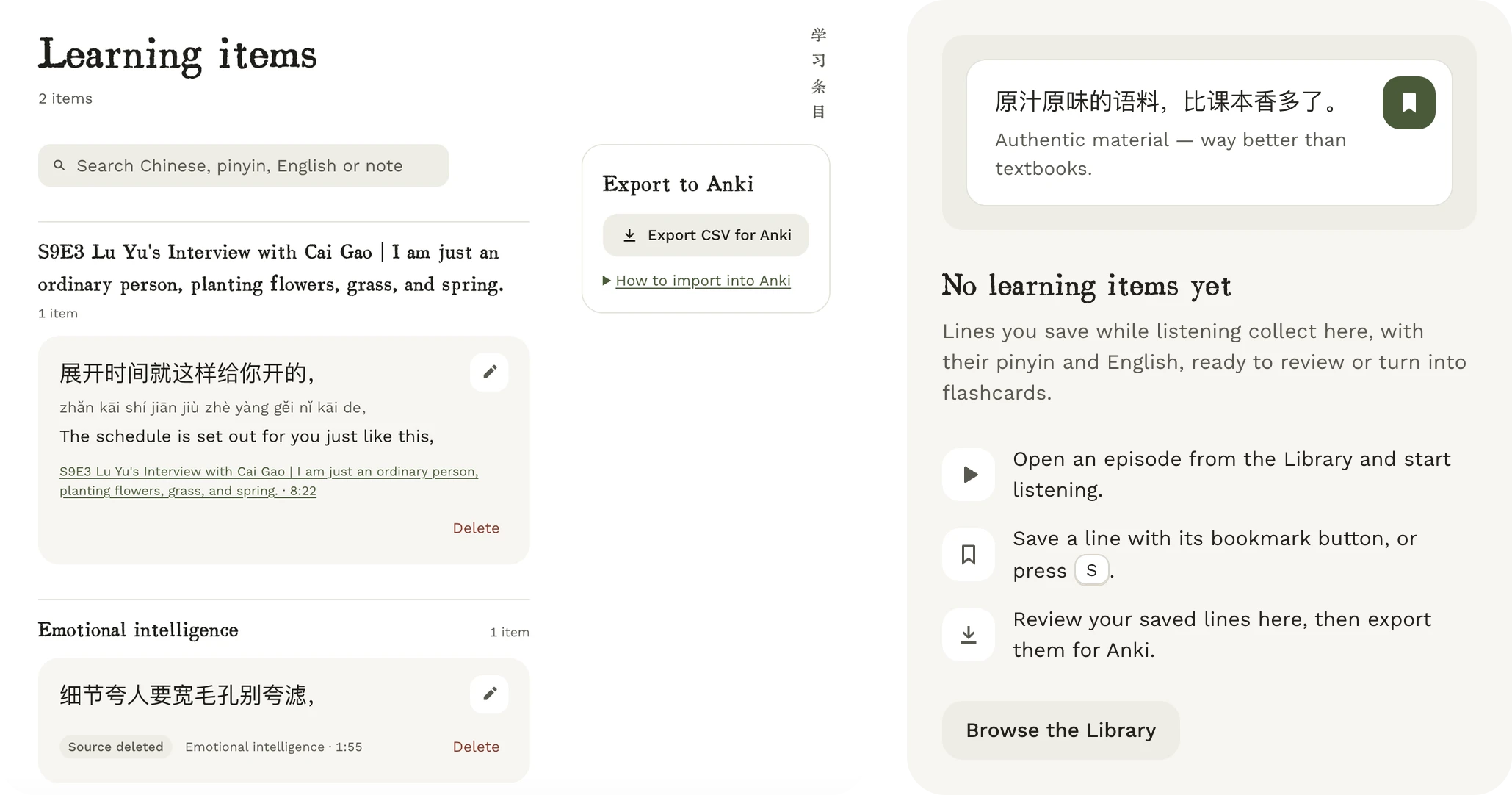
Learners save a line with its bookmark button or the S key. Saved lines collect in Learning items with their pinyin, English and source episode, and export as a CSV for Anki. First-time users see an empty state that explains the three steps.
Trusting the AI
Designing for failure modes
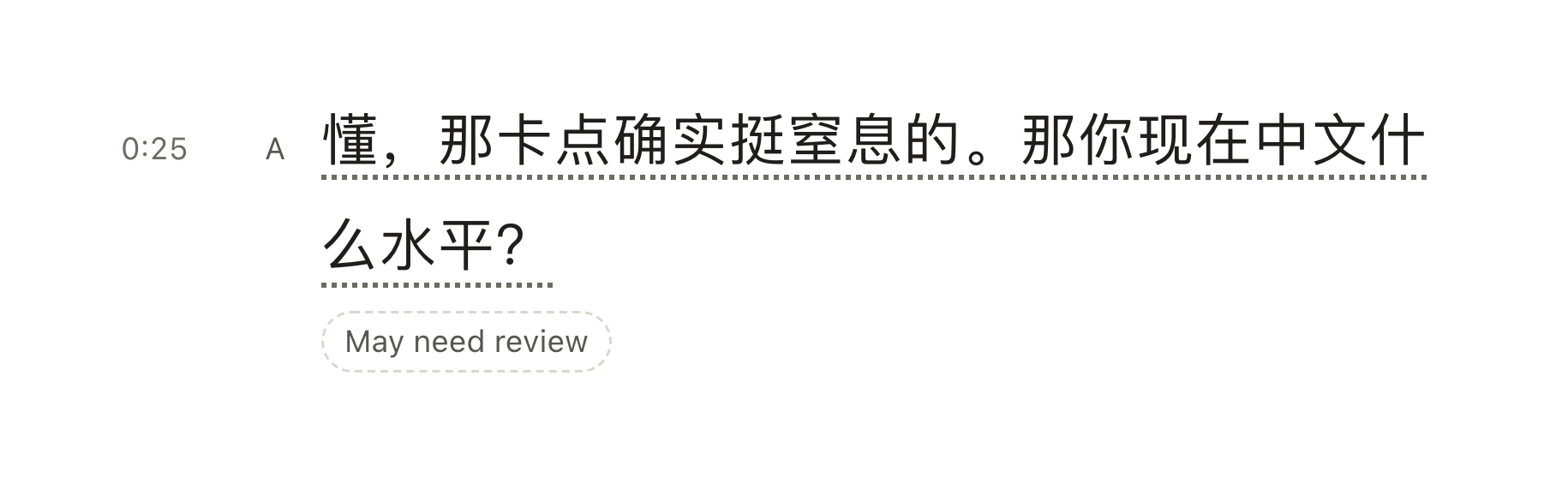
Hallucination is the default failure mode of AI. We can’t design it away, so I treat it as a constraint and over-index on surface area for trust. In Pebble, any line can be corrected by hand and reverted, and a line can be marked as “May need review” to be transparent about the model's limitations.
Designing for edge cases
Waiting with uncertainty was the most critical failure mode I designed for. Transcribing podcast episodes that last over an hour can take a while, and a loading spinner leaves people wondering whether anything is happening. People want to see work in motion to trust the process and catch errors early.
My first few iterations filled the progress bar only from real-time updates. During audio processing, Pebble splits the audio into sections, and the progress bar moves forward each time a section finishes. But that broke down for non-podcast audio, like music or short-form content.
Before
For a one-section clip, the bar sat empty and then jumped straight to done. This offered an underwhelming waiting experience.
After
Now the progress bar eases forward on an estimate and holds short of the end until the work actually finishes. Real-time updates still drive it, and the estimate fills the silence between them so the user always sees feedback.
Evaluating the AI by hand
When I played with the first iteration of Pebble, it failed badly. Words at the start or end of a line were clipped, and the transcript fell behind the audio when a podcast's background music confused the model. So I went back and evaluated the AI by hand to improve its accuracy.
I reviewed audio locally and rated each result on replay range, text, correction time and notes. Two numbers stood out.
Pebble transcribes a long podcast one short clip at a time, cutting at pauses in speech, and the words going missing were the ones at the edges of a clip.
How do you stop words going missing at the edges of a clip?
Keep cutting at pauses. Letting the clips overlap didn't bring the missing words back, and it made the system more complicated.
Option A: overlap the clips
Let each clip repeat 1–2 seconds of the one before it.
Option B: cut at pauses
FinalCut the audio only where the speaker pauses, and keep the clips separate.
I kept running more detailed evals to close the gap between highlighted text and actual audio, and moved on once it was accurate enough. On all 5 audios I tested, I could no longer hear a gap between the highlighted text and the audio.
Background music is the one problem I couldn't fix in the model. The “May need review” flag covers it for now, and I manually mark those lines as a third speaker that's left out of the transcript. That won't scale, so automating it is a next step.
Testing
Testing Pebble with other learners
Next I want to know whether Pebble works for other learners, so I plan to run a small pilot built around one question: can a learner take a short audio clip, get a transcript, replay and correct a confusing line, and leave with a saved phrase, without feeling confused or unsafe?
Success metrics
Phrases saved
Learners who save a phrase without help, and how many export it to Anki
Transcript trust
Lines corrected or flagged, against my 60% baseline
Sync accuracy
Gap between a line highlighting and its first words on learners' audio, against no audible gap on my 5 tests
Retention
A second episode within 7 days, then D7 and D30
Dictionary workaround
Do learners who click Get Zhongwen still ask for word-level translation?
Cost
Characters translated per episode
I also want to replace my manual marking of background-music lines with something that scales.
Reflection
Design for the AI's failure modes
Designing with AI meant designing for its failure modes, and with 60% of reviewed text needing intervention, trust came from visible work, editable text and replay. With limited time and a translation budget, the best decisions were the highest leverage ones, like translating on tap and pointing learners to a dictionary extension instead of building one.